
If you are looking at Caterease alternatives, the first honest thing to say is that Caterease may not need an alternative at all: it is event planning software, and for the caterer whose team books and runs each event, that is the right tool for the job. This post is for a different reader, the multi-site operator running corporate catering, where most orders are a department buying lunch for a meeting and the buyer expects to order for themselves. We wrote it the same way we wrote our CaterTrax comparison: every statement about Caterease comes from Caterease’s own pages, checked 7 and 8 October 2026, and where its pages do not describe something, we say “its pages do not describe it,” never “Caterease can’t.” The full requirements picture behind this post is in our guide to what a catering management system actually needs to do.
TL;DR
- Caterease, in its own words: an all-in-one tool for booking and running events, with real depth in staffing, recipes, packing lists, and client documents.
- What a multi-site corporate program needs is a different list, and the last three items are the ones Caterease’s pages do not describe.
- Floor plans: Caterease connects to floor plan tools, and that is a good reason to choose it. Rally Catering does not draw floor plans.
- How corporate catering events run in Rally Catering: one system for the everyday orders and the events, shown screen by screen.
- Why operators look beyond Caterease, and the honest note: we have no record of anyone moving their events off it.
- Pricing, side by side, from each company’s own published pages.
Our picks at a glance, matched to who builds the order:
| Best for | Our pick |
|---|---|
| Full-service events your team books, weddings and social events included | Caterease |
| Events that need floor plans or seating charts | Caterease, with the floor plan tools it connects to |
| Multi-site corporate catering, self-serve orders and corporate catering events in one system | App8’s Rally Catering |
| A second events-side option to evaluate | Total Party Planner, which lists online catering orders and says it lets you organize room layouts |
Caterease, in its own words
Caterease’s pricing page calls it “your all-in-one solution for managing every aspect of your catering and event planning operation.” Its features page is built around booking and running events: event booking wizards for each type of event, menu building with packages and minimum quantities, custom printed documents for the kitchen and the client, shifts and staffing with scheduling conflicts tracked, recipes and packing lists compiled as the event menu is built, card payments with a payment link, a client event portal with templates sent for electronic signature, and a kitchen display of the day’s items. Beyond that, its pages show an inventory of reusable items, cost and profit analysis, and two add-on modules: Banquet Rooms, which records each room’s setup styles, capacity, and charges, and Guest Rooms Manager.
Two more things its pages say, which matter for fairness: its restaurant page says Caterease serves restaurants “From independent operations to large chains,” and its Professional plan, the top of three, is described as “For high-volume event management.” Caterease also lists online ordering: its home page says “Accept online orders and inquiries.” So does Total Party Planner’s features page. Treat self-serve ordering as a need to verify in a demo, not a difference to assume.
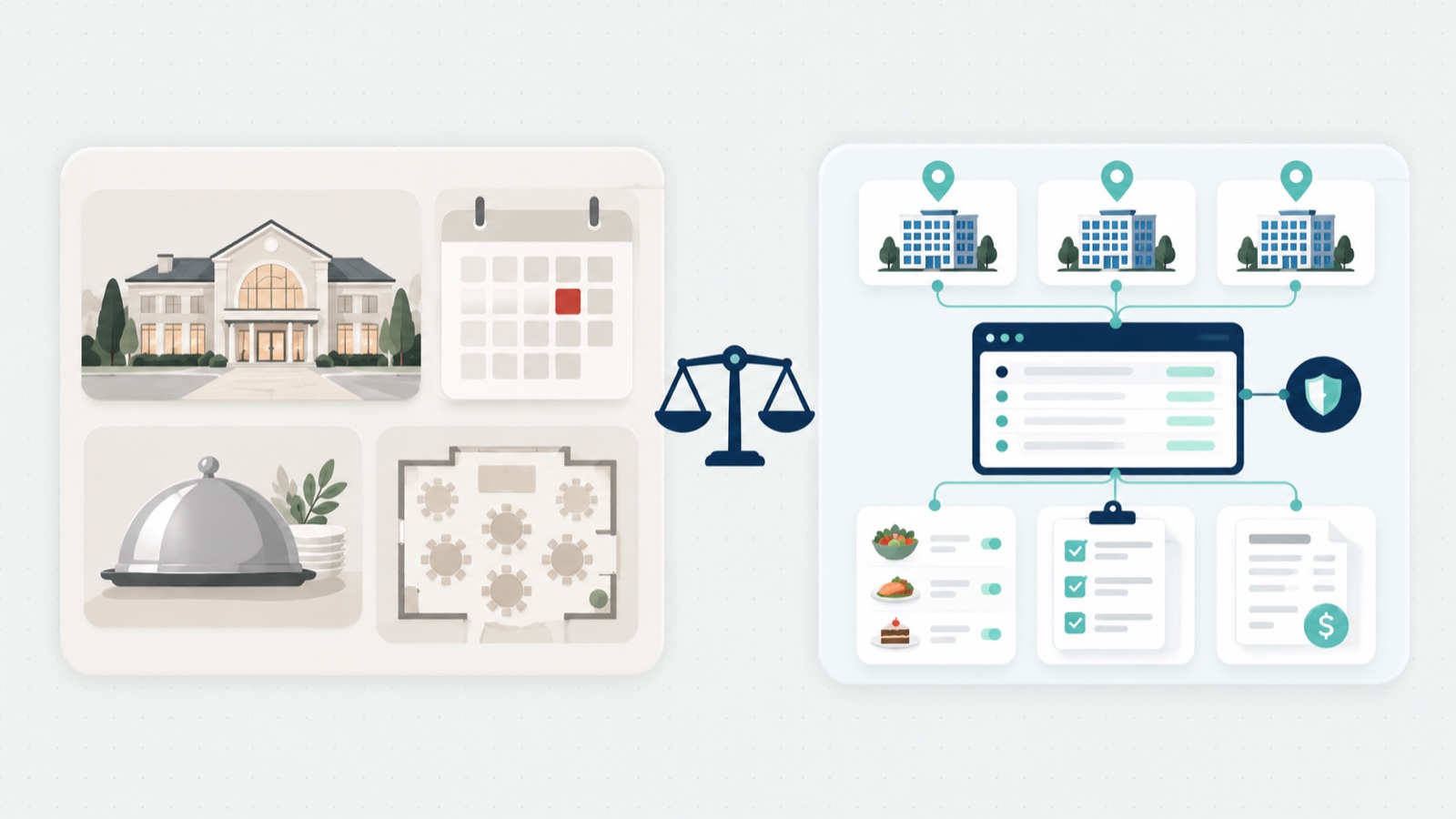
In App8’s view, the fit its features describe is clear: a caterer or venue whose team takes each booking, builds the menu, and runs the staff, recipes, and packing for it.
What a multi-site corporate program needs
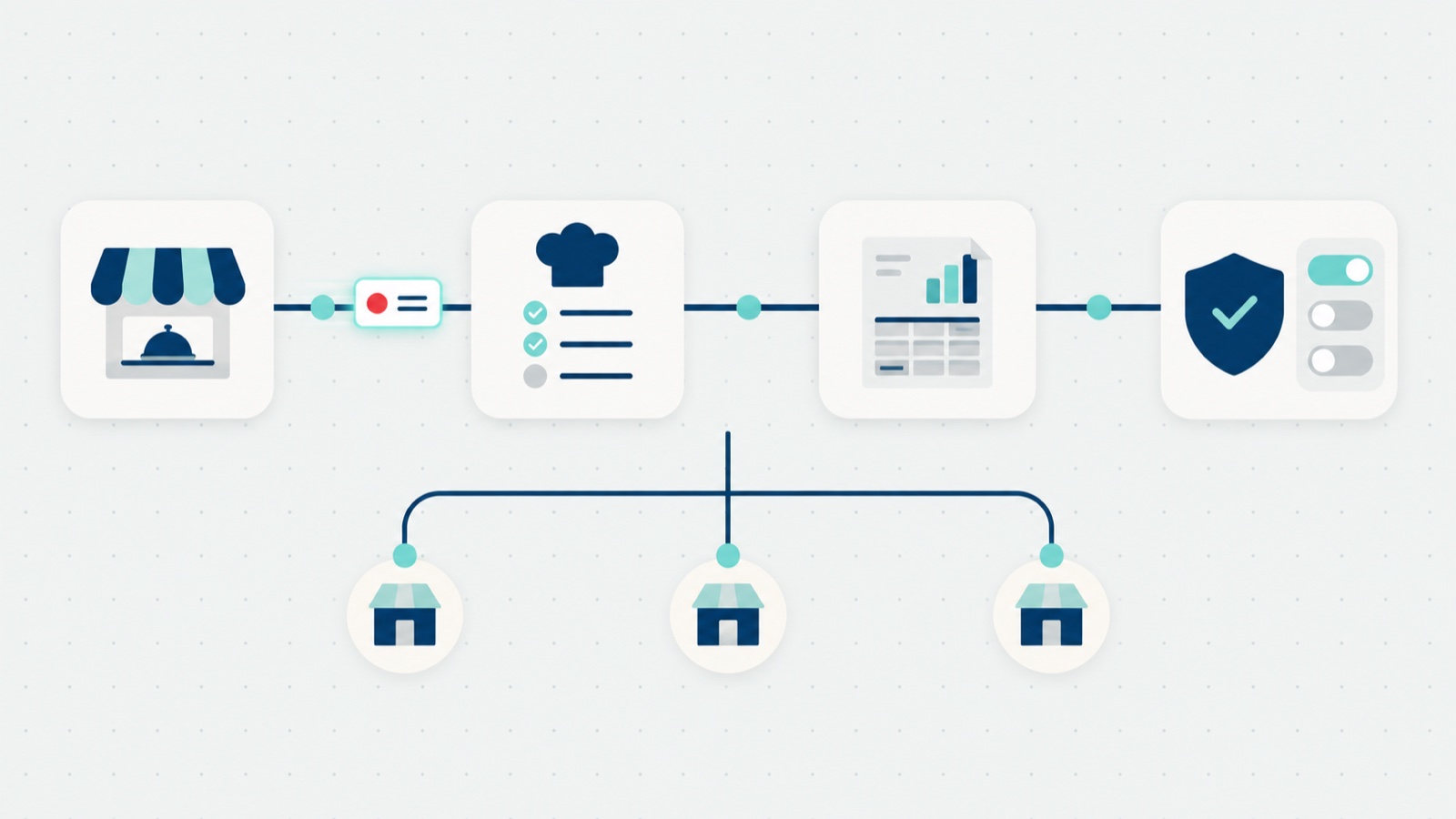
A multi-site corporate catering program runs on a different rhythm: most of its orders are standard, placed by the client’s own people, and billed to a department. In App8’s view, five things decide whether a platform fits that work, and the last three are the ones Caterease’s pages do not describe:
- Clients order for themselves. A department ordering lunch for a meeting expects a menu with prices and ordering rules, like any shopping site, not a wait while a coordinator books an event.
- The money flows into the operator’s accounting. What each client owes reaches the operator’s accounting system without anyone re-typing it. Caterease’s pricing page shows accounting tools such as QuickBooks and Sage among its integrations.
- One system runs every site. Each site keeps its own menu, rules, and kitchen, and head office sees every site’s orders in one view.
- Each order carries the client’s billing code. The department’s cost center or PO number rides on the order, and the invoice reaches the client’s finance team with that code on it. The mechanics are in our catering accounting deep dive.
- The client’s IT team signs off. Many client companies ask for single sign-on and a security review before employees can use the system. App8 sets up single sign-on wherever an operator’s client company needs it.
Floor plans and seating charts
Say it plainly, because it decides real buyers: Caterease does not list built-in floor plans or seating charts on its own pages, and it connects to floor plan tools for that work. Its pricing page shows Social Tables, now Cvent Event Diagramming, which offers interactive floor plans and seating charts, and Allseated, now Prismm, which offers floor plans, among its integrations. If your events need floor plans or seating charts, that is a good reason to choose Caterease: Rally Catering does not draw floor plans or seating charts.
How corporate catering events run in Rally Catering
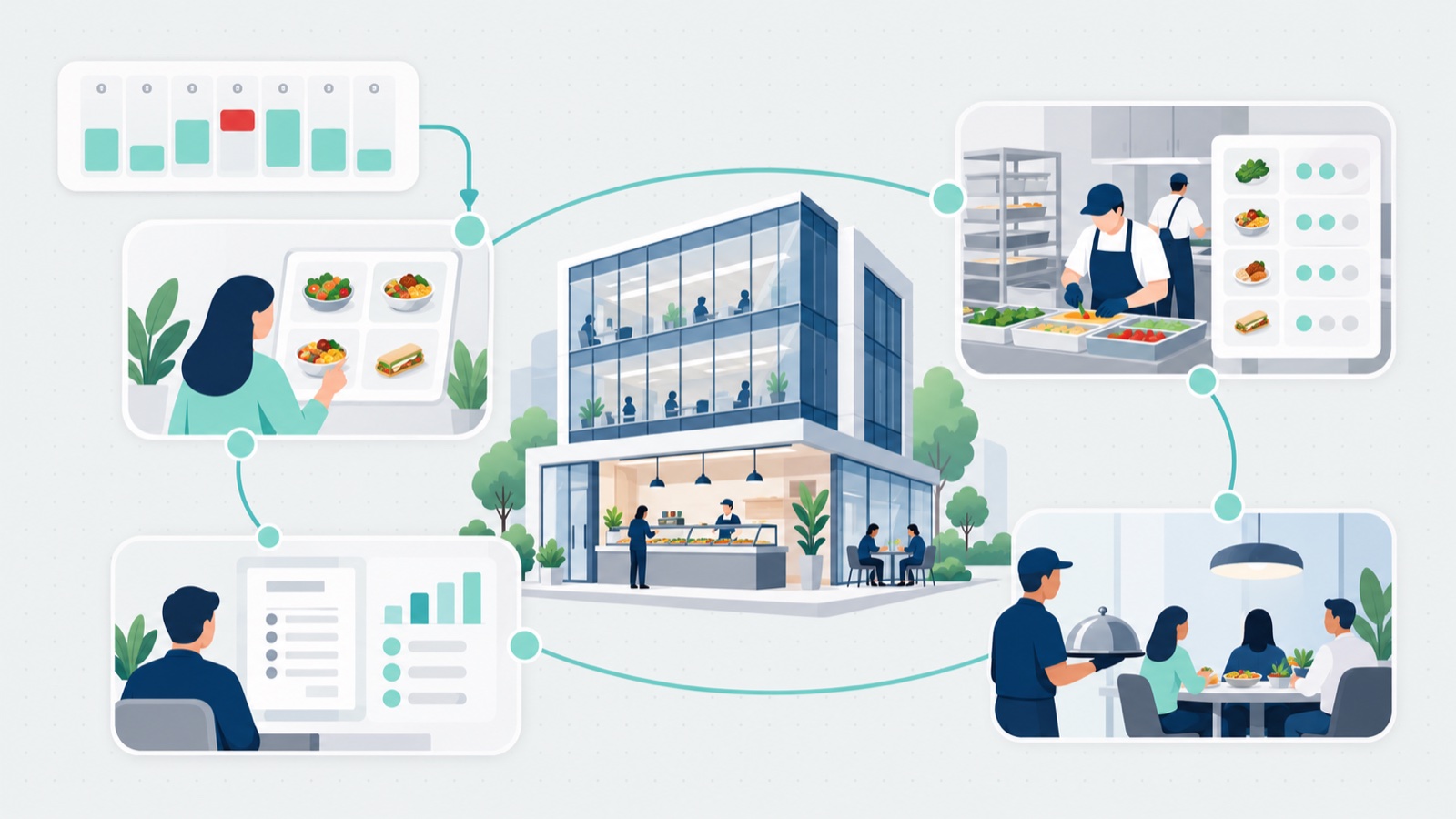
The two products are built for different jobs. Caterease is built to manage events: a coordinator books each one, builds its menu, and runs the staff, recipes, and packing for it. Rally Catering runs corporate catering events inside the same ordering system the operator uses for everyday catering orders, live since 29 September 2026. In the product page’s words: board meetings, offsites, and client hosting run in the same system as the rest of your catering. A request arrives by phone, email, or an inquiry form, and your team turns it into a quote. The client accepts it from an email link or secures it with a deposit, and your kitchen and event team work from one banquet event order (BEO).
Here is one event, from the client’s first click to the kitchen, on App8’s demo site with test data.
The client lands on the operator’s branded catering page and picks one of two paths: they order straight from the menu and see prices right away, or, if they do not know what to order or they are planning a bigger event, they send an inquiry.
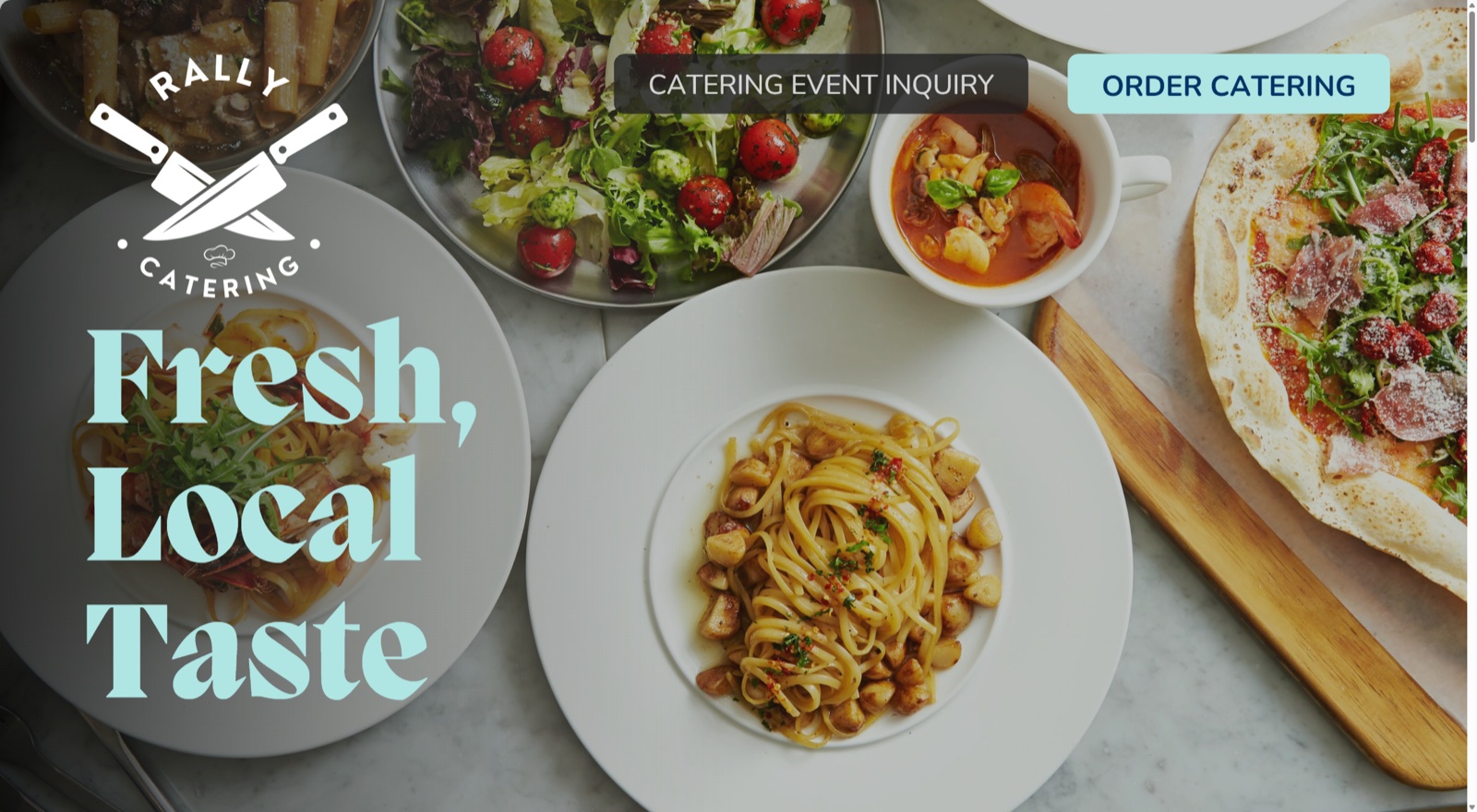
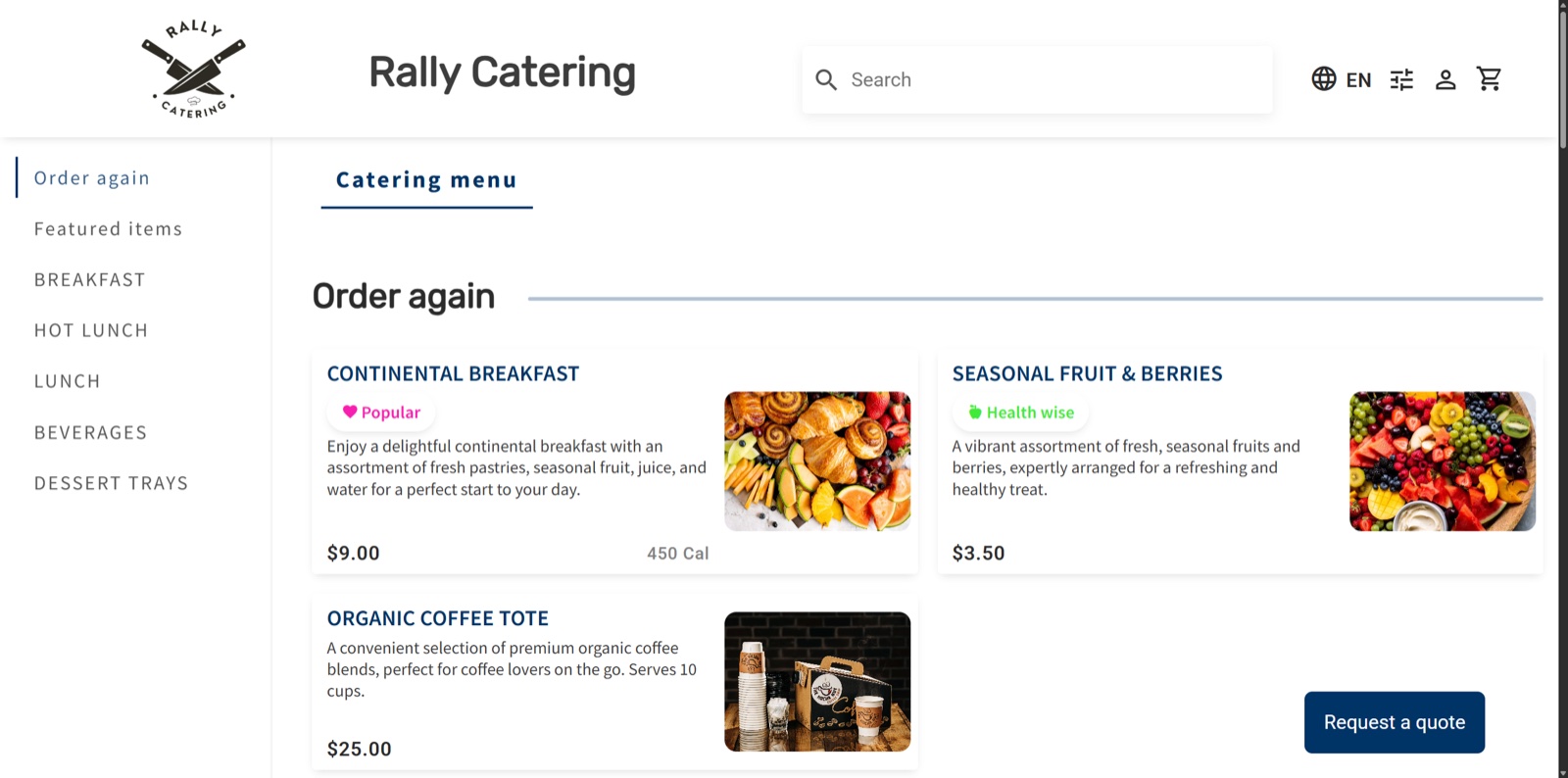
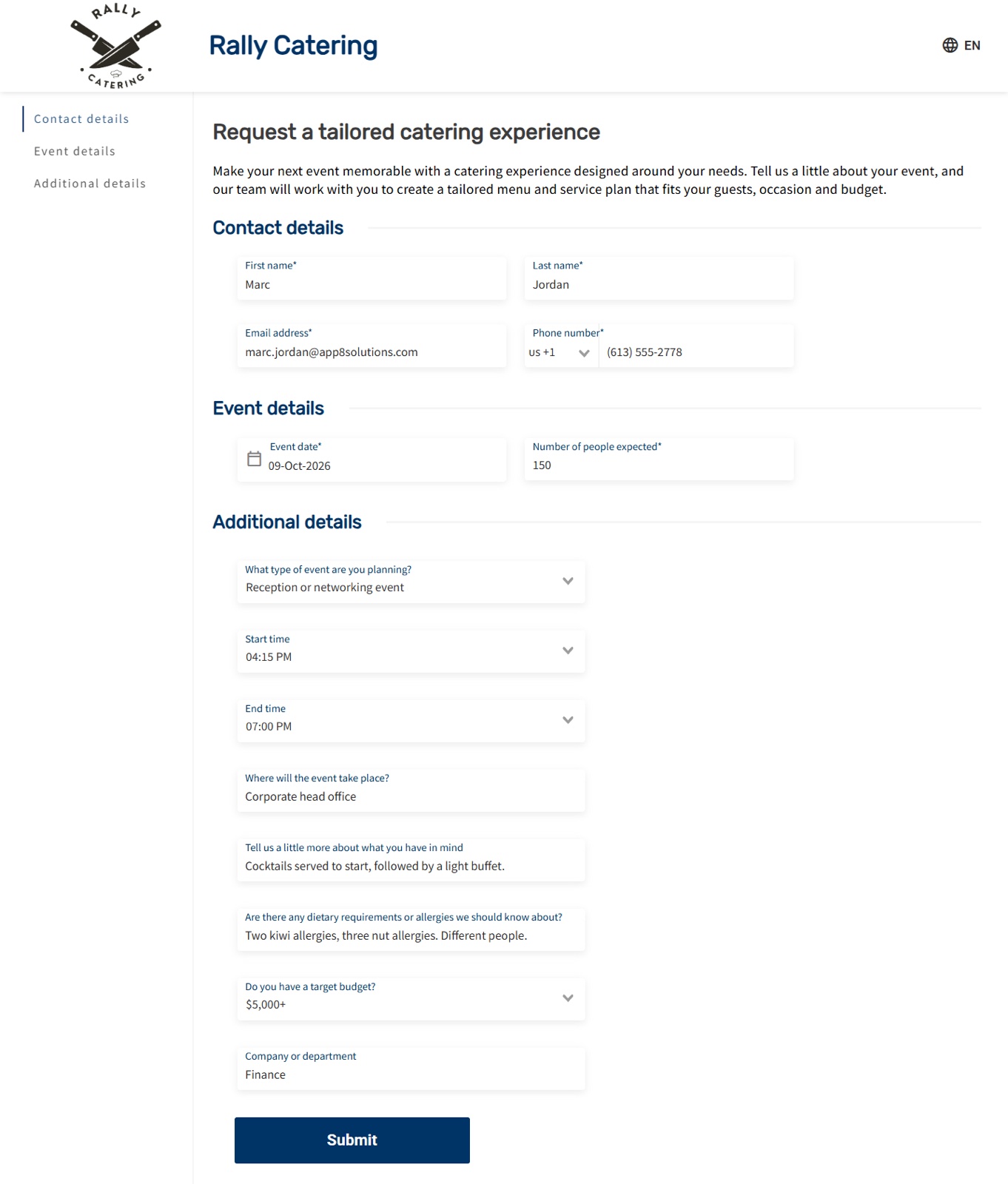
The inquiry form asks for contact details, the event date, and the guest count, plus the operator’s own questions, here the event type, times, location, dietary needs, budget, and department.
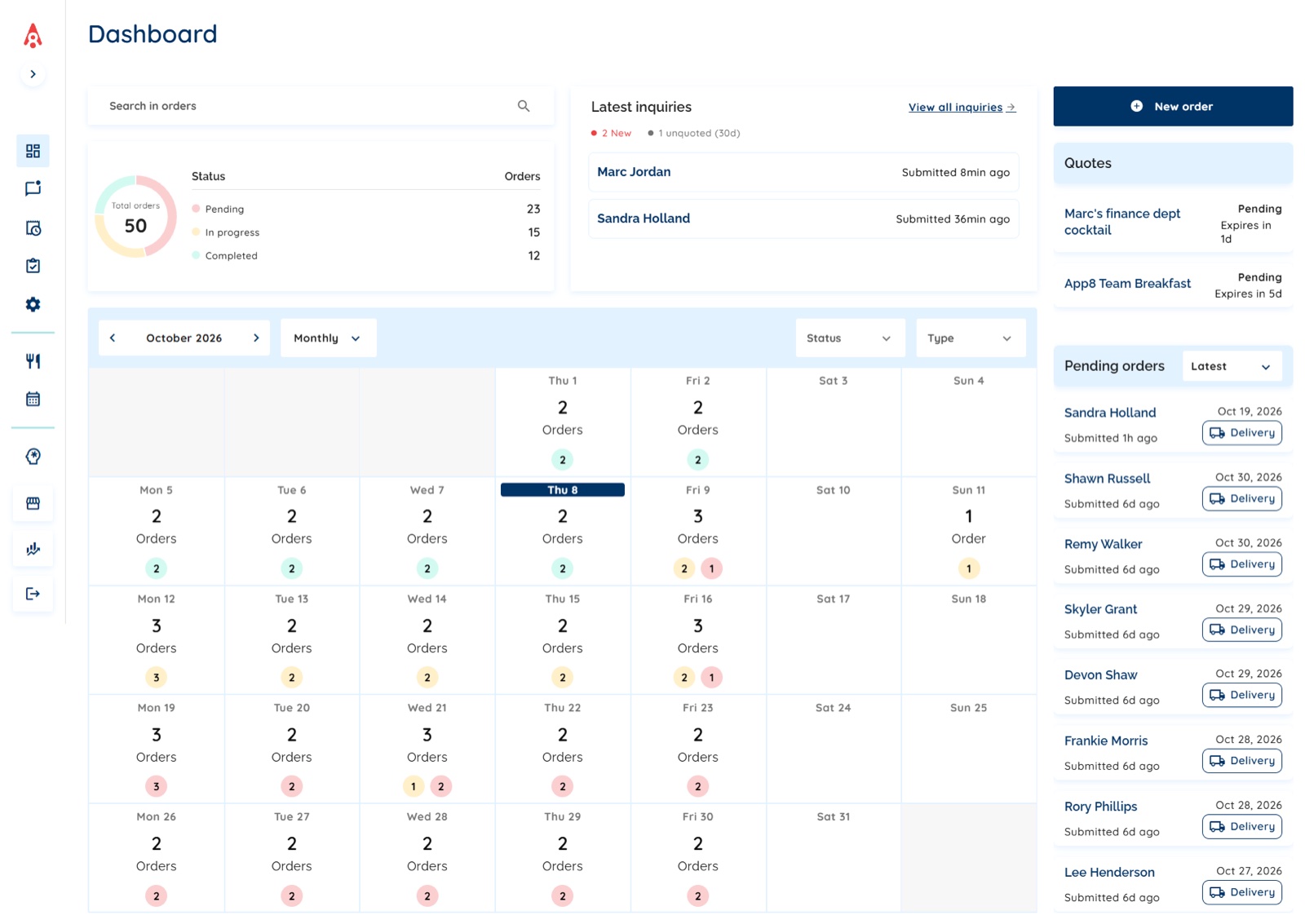
Both paths land in the same dashboard, Order Manager, where the operator sees orders by status, the month on a calendar, the latest inquiries, open quotes, and pending orders. The operator’s team can also start an event order itself, without the form.
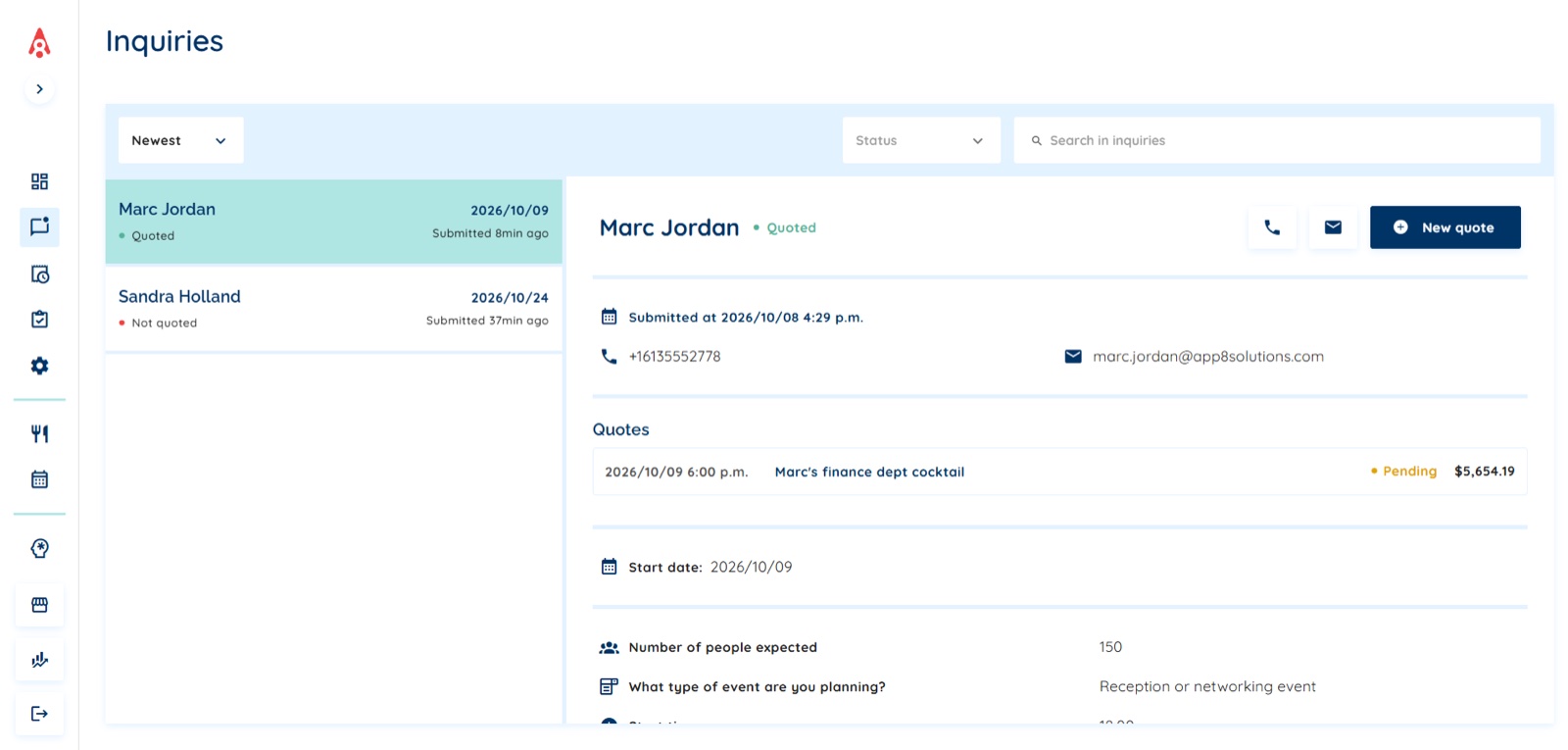
The team builds the quote from its menus. Staffing and equipment go on as priced lines, such as servers by the hour or table linens, that the client sees on the quote but never on the public menu. The team chooses what the quote asks the client to do: approve it, or pay a deposit, and paying the deposit also approves the quote.
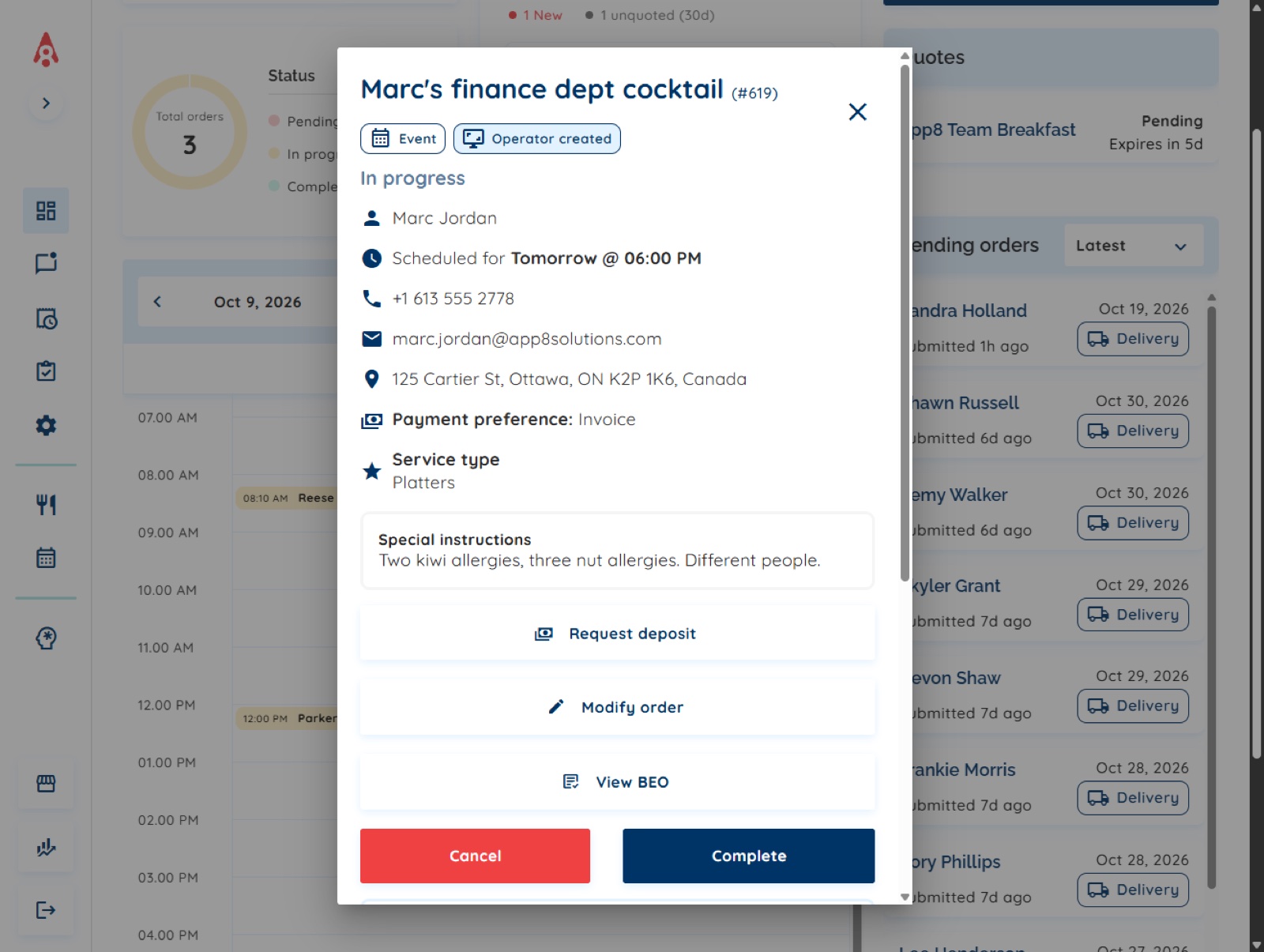
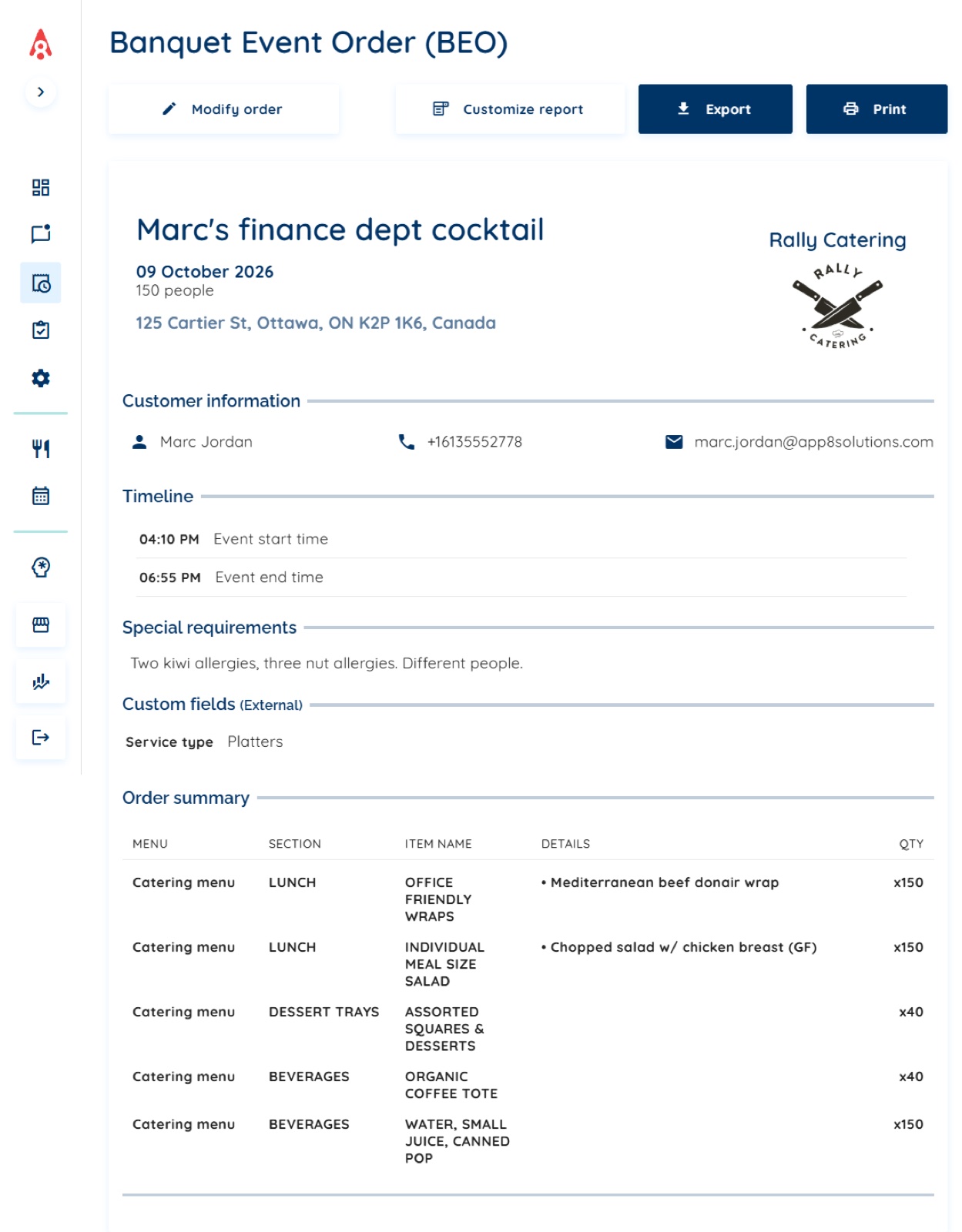
Once the client accepts, the event runs like any other order. The banquet event order (BEO) is built from the order itself, so the kitchen and event team work from the same details the client approved: the event timing, headcount, address, special requirements, and the order summary, printed or exported to Word to edit.
And the event’s items land on the same production sheet as the day’s other orders, so the kitchen plans the day from one list that holds the everyday lunches and the events together.
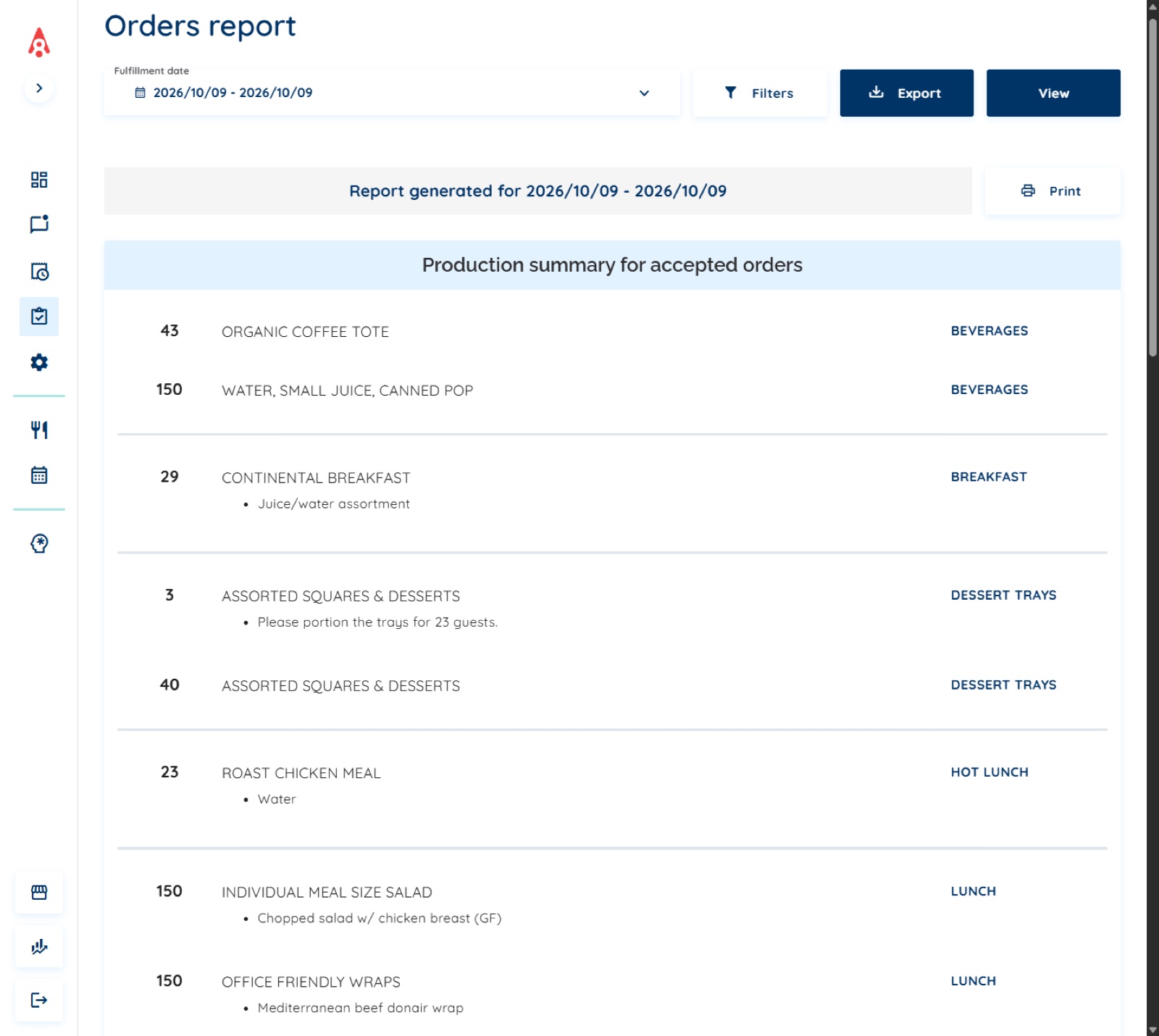
Why that matters, in App8’s view: most of a corporate client’s catering is standard orders they want to place themselves, and some of it is an event that needs a conversation, a quote, and a deposit. In our conversations with operators, many need both. When the two run in separate tools, orders live in two places. Rally Catering was built with both paths in one system from the start.
Why operators look beyond Caterease, and what holds them back
An honest note first: we have no record of an operator moving its events off Caterease and onto App8. What we do see, in our sales conversations with caterers through 2025 and 2026, is caterers who run their events in Caterease looking at App8 to take their everyday corporate orders online, while keeping Caterease for events.
What makes them look, in App8’s view, from those conversations: everyday orders still arrive by phone and email, and someone types each one in by hand; event inquiries sit in an inbox or a separate web form, apart from the orders; they want an “order now” button on their own website; and the events team ends up handling the everyday lunch orders on top of the events.
And what holds them back: running two systems side by side, which means two sets of reports, invoices from two tools, and two lists the kitchen has to merge into one plan for the day; learning another system; moving their data; and payments, since their card processing runs through their current system. In App8’s view, the first of those is exactly why Rally Catering keeps everyday orders and corporate catering events in one system, so an operator does not end up running two.
Who should stay on Caterease
In App8’s view:
- A caterer or venue built on full-service events, weddings and social events included, whose team books each event. Caterease’s staffing, recipes, packing lists, e-signature, and room features are built around that work.
- An operation whose events need floor plans or seating charts. Caterease connects to floor plan and seating tools for that work, and Rally Catering does not draw them. This is a good reason to choose Caterease.
- A small team that knows it well and takes most orders by phone. Changing systems may cost them more than it saves.
App8 is for a different reader: a multi-site operator running corporate catering for client companies, where clients order for themselves and orders are billed to a department.
Pricing and integrations, side by side
Caterease publishes plan prices plus a fee for each additional user and for each add-on module. App8 charges one fixed subscription with no fee per user. Neither publishes contract length or cancellation terms on the pages we read, so we state none.
| Caterease, from its own pages (7 October 2026) | App8, from its public pages and its Capterra listing | |
|---|---|---|
| How it’s priced | Express $99 a month, Standard $149 a month, Professional $199 a month, all billed annually | One fixed subscription with no commission on orders, billed monthly or annually. App8’s Capterra listing shows a starting price of US$199 a month, flat rate |
| Users | $28 a month for each additional user, on every plan, plus a one-time $200 launch fee per user. The page does not say how many users each plan includes | No fee per user. App8 sets up the users an operator needs, access is set by role, and an operator’s administrators can be given rights to manage their own users |
| Modules | ”No modules included” on any plan. Web Inquiry, Prospect Manager, Document Builder, Banquet Rooms, and Guest Rooms Manager are $25 a month each, billed annually | One subscription per operator’s program, with no per-module prices published |
| Integrations | Add-ons at $25 a month each, billed annually: Staffmate, Yellow Dog, Social Tables, Sage, Reciprofity, Nowsta, Intuit QuickBooks, Food Trak, DocuSign, Costguard, Constant Contact, Client Point, ChefTec, and Allseated | App8’s enablement team, the group that builds each operator’s connections to its other systems, sets up what each operation needs. Examples include JD Edwards (accounting), FreedomPay (payments), GiveX (gift cards and loyalty), and Punchh (loyalty) |
| Payments | Mosaic Payment Processing included in every plan; processing fees apply | Clients pay by credit card, by invoice, or on a house account billed later on agreed terms. The order carries the client’s PO number, and the charge is assigned to the client’s cost center |
Because Caterease’s pricing page does not say how many users each plan includes, we do not total a cost for either product. On payments, many enterprise operators keep the card processing contract they already have; others use one of App8’s preferred payment partners. On security, App8 is PCI DSS Level 1, and the payment providers App8 uses are PCI certified.
Choosing among Caterease alternatives
The question that sorts this entire category: who builds each order? If your team books every event, buy the tool built for your team, and Caterease is a serious one. If your clients place most orders themselves and your events are corporate, board meetings, offsites, and client receptions billed to departments, look at the platform that runs both paths in one system. Score your own program on the catering scorecard in 90 seconds, read the full requirements in The Catering Operations Playbook, free with no sign-up, and if the corporate path sounds like your operation, talk to us and ask to see the event flow above, live.
Frequently asked questions
What is Caterease?
Caterease is catering and event planning software. Its pricing page calls it your all-in-one solution for managing every aspect of your catering and event planning operation, and its features are built around booking and running events: event booking wizards, menu building with packages, custom printed documents, shifts and staffing, recipes and packing lists compiled from the event menu, card payments, a client event portal with electronic signature, and a kitchen display. It sells three plans, Express, Standard, and Professional, and its restaurant page says it serves restaurants from independent operations to large chains (caterease.com, checked 7 and 8 October 2026).
What are the best Caterease alternatives?
It depends on the work. For a caterer or venue whose team books and runs full-service events, weddings and social events included, Caterease is built for exactly that, and Total Party Planner is the other name in that lane; its features page says it lets you organize room layouts and lists online catering orders. For a multi-site operator running corporate catering, where clients order for themselves and orders are billed to departments by cost center or PO number, App8's Rally Catering is built for that buyer, and runs corporate catering events in the same system as the everyday orders.
How much does Caterease cost?
From its pricing page, checked 7 October 2026: Express $99 a month, Standard $149 a month, Professional $199 a month, all billed annually, plus $28 a month for each additional user on every plan with a one-time $200 launch fee per user, and $25 a month each for add-on modules and integrations, billed annually. The page does not say how many users each plan includes. For comparison, App8's Capterra listing shows a starting price of US$199 a month, flat rate, and App8 charges no fee per user.
Does Caterease have floor plans and seating charts?
Caterease does not list built-in floor plans or seating charts on its own pages. Its pricing page shows Social Tables and Allseated among its integrations: Social Tables is now Cvent Event Diagramming, which offers interactive floor plans and seating charts, and Allseated is now Prismm, which offers floor plans. So Caterease connects to floor plan tools for that work, and events that need floor plans or seating charts are a good reason to choose Caterease, because Rally Catering does not draw them.
Who should stay on Caterease?
In App8's view: a caterer or venue built on full-service events whose team books each event, since Caterease's staffing, recipes, packing lists, e-signature, and room features are built around that work; an operation whose events need floor plans or seating charts, through the floor plan tools Caterease connects to; and a small team that knows it well and takes most orders by phone, where changing systems may cost more than it saves.